.svg)





SAP Quotation Management and Multi-Line RFQs: Why Complex Quote Requests Still Take Days
SAP Sales and Distribution supports quotation creation natively. For standard requests, the workflow is manageable. For complex multi-line RFQs — requests with 20+ line items, non-standard configurations, or cross-plant availability requirements — the SAP quotation process breaks down into a multi-day manual assembly exercise. This post maps exactly where SAP quotation management stalls on complex requests and what automated intake changes.
SAP Sales and Distribution supports the full quotation lifecycle. For standard single-plant requests at contracted prices, the workflow is functional. For complex multi-line RFQs — 20+ line items, non-standard pricing, or cross-plant availability — the process collapses into a 2–5 day manual assembly exercise. In most SAP environments, 50–70% of order and quote volume arrives via email in unstructured format, and each complex RFQ requires sequential manual steps across SD, MM, PP, and pricing master data before a quotation can leave the building. This post maps exactly where SAP quotation management stalls and what changes when automated intake replaces the manual assembly model.
Table of Content
- SAP SD Creates Quotations: Complex Multi-Line RFQs Still Require Manual Assembly Across Multiple SAP Modules
- Non-Standard Pricing Is the Longest Bottleneck in SAP Quote Production
- Cross-Plant Availability on Multi-Line RFQs Creates a Coordination Problem SAP Cannot Resolve Automatically
- Automated RFQ Intake Produces SAP Quotations in Hours, Not Days
- The Autonomous Execution Fabric: Full SAP Commercial Execution Beyond Quotation
- Frequently Asked Questions
- Why do complex multi-line RFQs take so long to quote in SAP environments?
- What are the main bottlenecks in SAP SD quotation management for B2B manufacturers?
- How do B2B manufacturers handle cross-plant availability checks for large RFQs in SAP?
- Can AI automate SAP quotation creation for complex multi-line RFQ requests?
- How do B2B distributors reduce quote response time in SAP without restructuring their pricing master data?
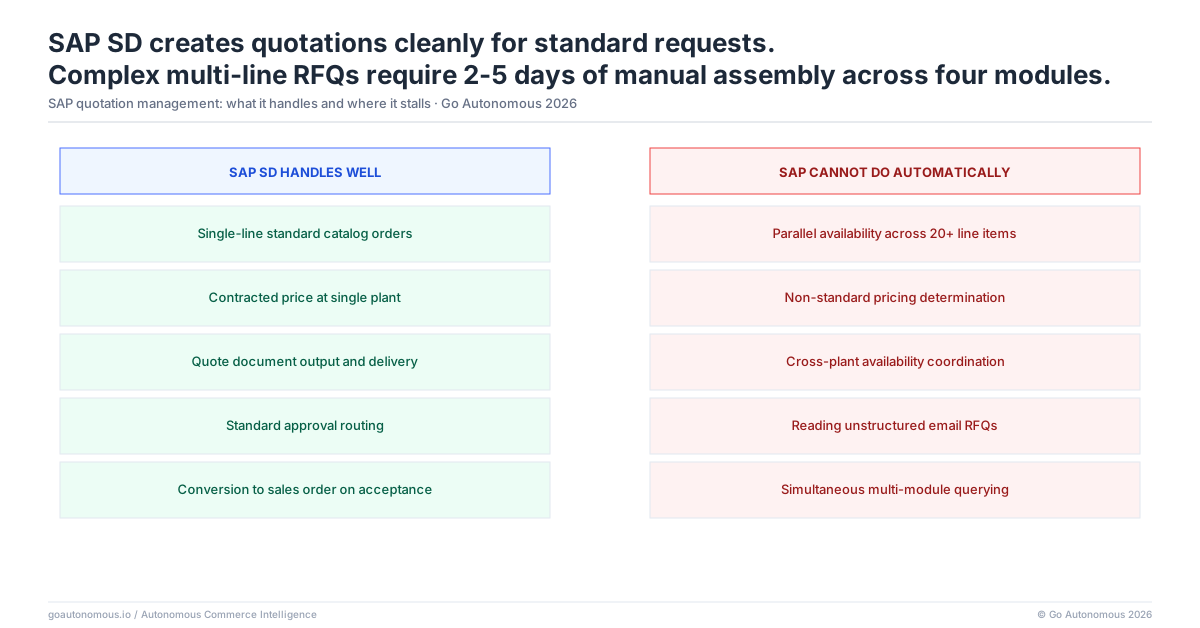
SAP SD Creates Quotations: Complex Multi-Line RFQs Still Require Manual Assembly Across Multiple SAP Modules
What the SAP Quotation Workflow Covers: SD, MM, PP, and Pricing Condition Records
SAP Sales and Distribution (SD) supports the full quotation lifecycle: inquiry creation, quotation generation, pricing condition determination, and conversion to sales order on acceptance. For a standard single-plant request involving catalog products at contracted prices, this workflow functions reasonably well. The sales rep creates the inquiry in SD, the system retrieves applicable condition records, an availability check confirms stock at the relevant plant, and the quotation is issued. Transaction times for simple requests in a well-configured SAP environment are measured in minutes.
The complexity compounds when the request touches multiple SAP modules simultaneously. Multi-line RFQs require MM (Materials Management) for availability and procurement data, PP (Production Planning) for make-to-order items where stock is not available, and pricing master data that may sit across multiple condition tables depending on customer segment, material group, and sales organization. None of these modules are designed to be queried in parallel for a single quotation event. The SAP architecture assumes sequential processing: check availability, then determine pricing, then assemble the quotation document.
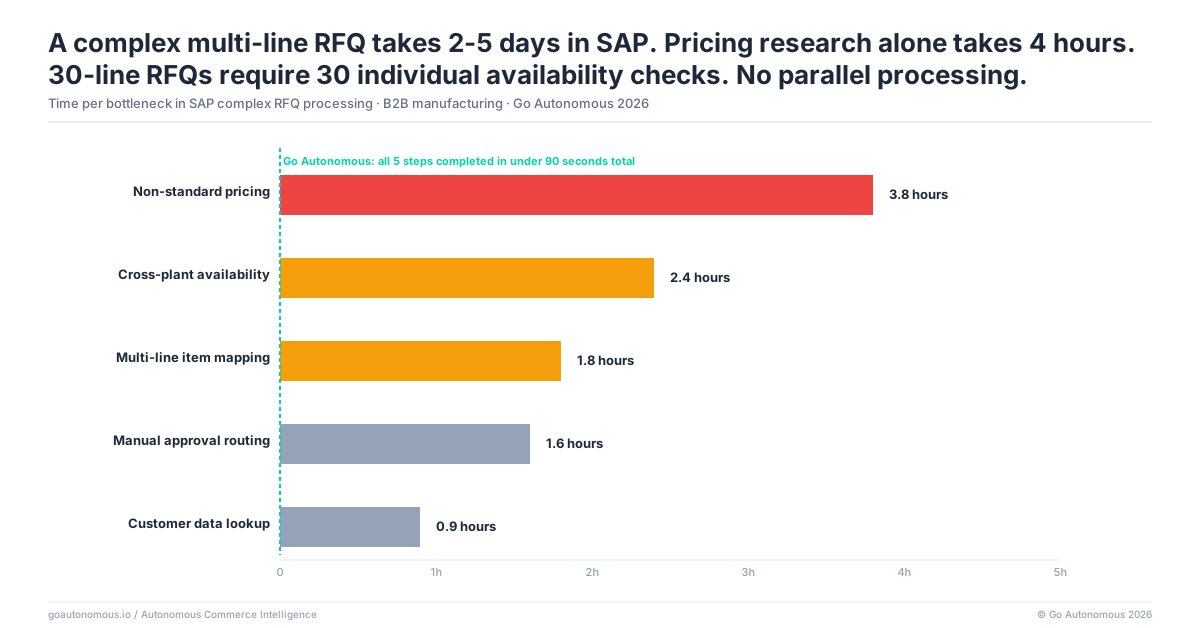
Where Manual Steps Enter: Availability Checks, Non-Standard Pricing, and Cross-Plant Coordination
The breakdown occurs on complex requests. A 30-line RFQ in SAP requires 30 individual availability checks and 30 pricing condition verifications before a quotation can be submitted. There is no native SAP function that reads an inbound RFQ document, automatically checks availability across all line items simultaneously, and produces a complete quotation. Each line must be processed individually.
For non-standard items — products not in the standard catalog, items requiring customer-specific configurations, or materials with lead times that depend on current production schedules — the manual effort compounds further. The sales rep cannot complete the quotation from within SD alone. They must query MM for procurement lead times, consult PP for production availability windows, and in many cases contact plant-level personnel directly to confirm whether a delivery date is achievable. The efficiency cost accumulates line by line across the entire request.
Each time we added one or two million euros in revenue, we had to add another operator. From a cost perspective, that's an unsustainable way of operating a business.

Non-Standard Pricing Is the Longest Bottleneck in SAP Quote Production
What Happens When a Line Item Falls Outside Standard SAP Condition Records
SAP pricing condition records cover contracted prices, standard discounts, and volume-based pricing. They do not automatically resolve pricing for requests that fall outside these parameters: spot pricing for non-contracted customers, special discounts for strategic accounts, project pricing for large one-time purchases, or pricing for new products not yet in the condition record structure.
When a line item on an RFQ falls outside standard condition records, the SAP quotation process stops. The sales rep cannot produce a price without either creating a new condition record — which requires master data access and IT involvement in many organizations — or routing the request to a pricing manager for manual determination. In practice, the quote waits for the pricing manager’s queue. Rule-based automation in SAP pricing plateaus at approximately 60% touchless; the remaining 40% requires human judgment, pricing manager approval, or exception handling that SAP condition logic cannot resolve automatically.
The Approval Chain That Adds 1–3 Days to Any Quote Requiring a Special Price
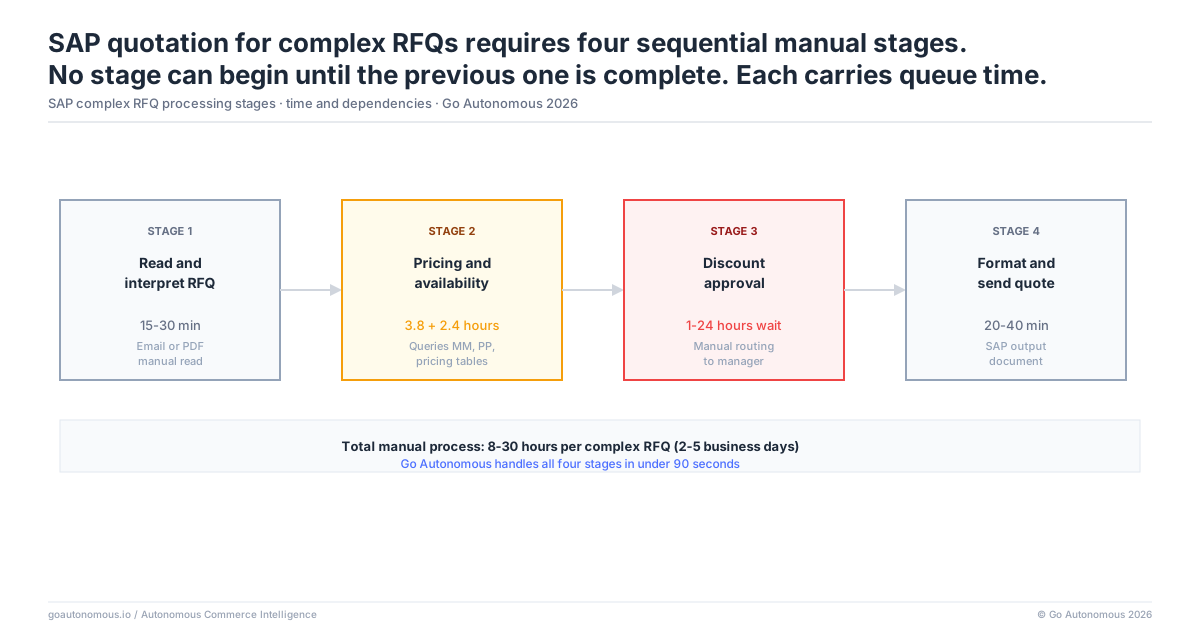
At organizations where pricing managers handle multiple accounts and product lines, the queue for non-standard pricing decisions is measured in days, not hours. A 20-line RFQ where 4 lines require special pricing approval creates a 1–3 day delay on the entire quotation, regardless of how quickly the other 16 lines can be priced in SAP. The standard lines sit completed in the system while the exception lines wait for a manager who is simultaneously handling pricing requests from other sales reps across other accounts.
The approval chain itself adds further delay. Many organizations require pricing exceptions above a certain discount threshold to be approved by a commercial director or finance controller in addition to the pricing manager. A 2-step approval on 4 exception lines across a 20-line RFQ can extend quote turnaround by 2–3 days on its own. The customer, who submitted the RFQ expecting a response within 24–48 hours, receives the quotation on day 4 or 5. At that point, win probability has declined significantly: research consistently shows that first-response advantage in B2B quoting is measured in hours, not days. Manual pricing queues are a direct commercial cost, not merely an operational inconvenience.
Cross-Plant Availability on Multi-Line RFQs Creates a Coordination Problem SAP Cannot Resolve Automatically
How SAP Handles Multi-Plant Availability: What It Does and Does Not Do Automatically
SAP’s availability check (ATP — Available-to-Promise) operates at the plant level. It confirms availability at a specified plant for a specified material and date. It does not automatically identify the optimal plant combination to fulfil a multi-line RFQ at minimum lead time. It does not automatically propose a sourcing split when no single plant can fulfil the full quantity across all lines. And it does not aggregate availability data across plants into a single consolidated quotation view that the sales rep can review and release.
For manufacturers operating multiple production or distribution sites, this is a structural gap. A 25-line RFQ where 8 lines require stock from plant A, 10 from plant B, and 7 from plant C requires the sales rep to run availability checks in three separate plant contexts, then coordinate the results into a single quotation document. SAP does not do this automatically. The rep must either know in advance which plant stocks which materials — which requires significant product and logistics knowledge — or query each plant sequentially until they identify the right source for each line.
The Manual Coordination Required When Stock Is Distributed Across Plants
In practice, cross-plant availability coordination involves direct communication with plant-level personnel: emails to stock controllers, phone calls to warehouse managers, or internal SAP messages to plant coordinators asking them to confirm available quantities and lead times. This coordination typically takes 1–2 business days per plant involved. A 3-plant RFQ has a built-in coordination delay of 2–4 days before a complete quotation can be assembled.
20–40% of orders and quotes in complex manufacturing and distribution environments trigger an exception of some kind, and each exception adds 4–8 times the base processing time. Cross-plant coordination is one of the most common exception types on multi-line RFQs, and it is also one of the most predictable: the stock distribution is known, the plants are known, and the coordination requirement is entirely mechanical. Yet SAP’s architecture requires a human to perform that mechanical coordination step. The result: the customer receives a quote 3–5 days after submitting the RFQ, well past the 4-hour threshold where win probability is highest. See how leading manufacturers have restructured this process at goautonomous.io/autonomous-commerce.
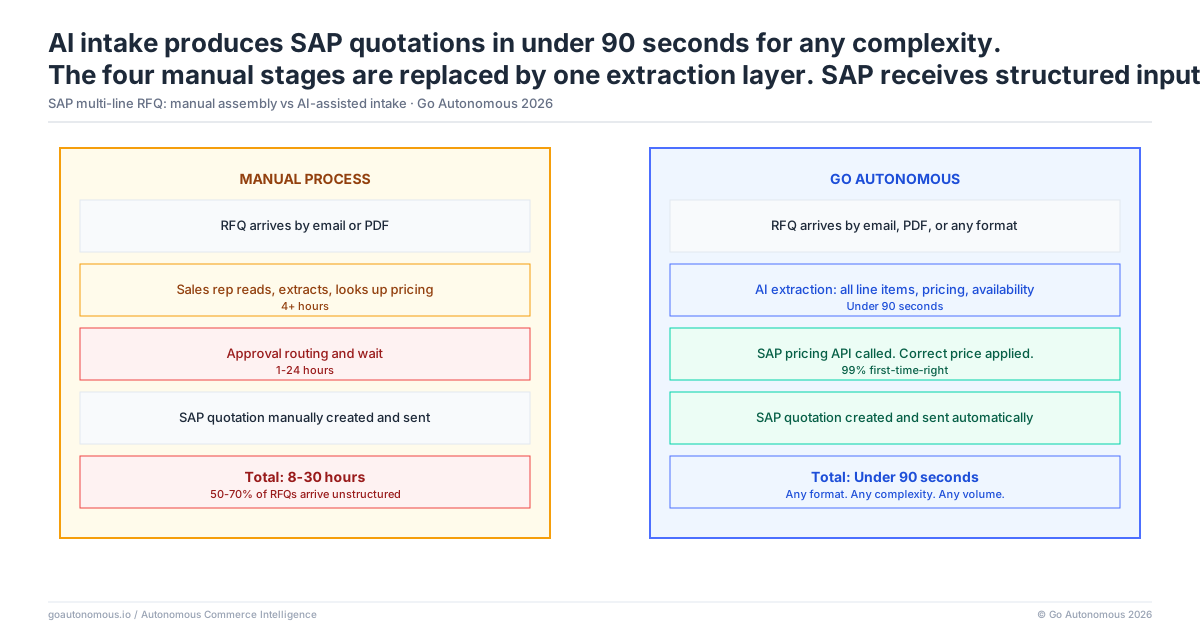
Automated RFQ Intake Produces SAP Quotations in Hours, Not Days
How AI-Assisted Quoting Reads the RFQ and Triggers SAP Availability and Pricing Checks Simultaneously
Automating the SAP quotation process for complex RFQs requires shifting from sequential manual steps to parallel automated checks. An AI-assisted quoting layer reads the inbound RFQ — whether it arrives by email, EDI, portal, or PDF — extracts all line items and specifications, and triggers parallel processing across SAP modules simultaneously. Availability checks run across all relevant plants for all lines at once. Pricing condition records are retrieved in parallel for every line. The system identifies which lines can be priced from existing condition records and which require exception handling, then routes the exception lines to the pricing manager immediately rather than queuing them behind the standard lines.
The draft SAP quotation is assembled automatically with all resolvable lines populated, all exception lines clearly marked with proposed pricing options or confidence ranges, and all cross-plant sourcing recommendations pre-calculated. The sales rep reviews a near-complete quotation rather than a blank SAP screen. This is not a replacement for SAP — it is an execution layer that handles the mechanical assembly work that SAP’s architecture requires humans to perform. Danfoss processes orders from 26 countries in a single day using this model, with average order processing time reduced from 42 hours to under 1 minute for automated lines. See the Danfoss case.
What SAP Quotation Operations Look Like When Assembly Time Is Eliminated
The operational profile changes substantially when assembly time is removed from the quotation process. Quote turnaround on complex 20–30 line RFQs compresses from 2–5 days to 2–4 hours for requests where pricing conditions are resolvable and availability is straightforward. The pricing manager’s queue shrinks because only genuine pricing decisions — not routine condition record lookups or threshold approvals for standard discount tiers — require their input. Cross-plant coordination is automated for standard availability scenarios, with genuine exceptions surfaced for human resolution rather than all coordination routed through human intermediaries by default.
SAP quotation quality also improves. When availability and pricing data flows directly from SAP into the quotation rather than through manual lookups that introduce transcription errors, error rates on submitted quotations decline. Nilfisk and other manufacturers operating in this model report that the commercial impact is not limited to cost reduction: faster, more accurate quotations convert at higher rates because customers receive complete, reliable responses within the window where buying decisions are still in play. The manual processing cost drops from €15–35 per transaction to below €2. The capacity released from manual assembly — 43% of operator capacity in documented deployments — redeploys to complex negotiations and strategic account management where human judgment creates genuine value. Full platform details at goautonomous.io/topline-growth-and-margin-management and a comparison with RPA approaches.
The Autonomous Execution Fabric: Full SAP Commercial Execution Beyond Quotation
The automated SAP quotation layer described in this post is one component of the Autonomous Execution Fabric: a full commercial execution layer that connects directly to your SAP SD, MM, and PP modules and executes every inbound commercial transaction without manual assembly. For complex multi-line RFQs, the Fabric reads the request from any intake channel (email, EDI, customer portal, or direct API), triggers parallel availability checks across all relevant SAP plants, retrieves pricing condition records simultaneously for all line items, and assembles a complete draft quotation for review — in hours rather than days.
The Fabric handles the full SAP transaction scope, not only quotations. When a quote is accepted, the Fabric converts it to a confirmed SAP sales order without re-entry. Subsequent orders from the same customer arrive through the same layer: product references are matched, pricing is retrieved from condition records, and the sales order is created in SAP in under 60 seconds. Returns authorizations, credit note processing, and contract tender responses all run through the same execution model. The sequential manual steps that make complex SAP quotation slow are removed across every commercial transaction type, not just the initial quote.
Multi-line RFQ delays in SAP are a specific instance of a structural pattern: when commercial execution requires sequential manual steps across multiple SAP modules, every transaction type that touches those modules is subject to the same delay. Operations with slow complex RFQ cycles typically have comparable delays on complex order intake, complex returns processing, and multi-plant replenishment requests — because the bottleneck is the manual coordination model, not the transaction type. The Autonomous Execution Fabric eliminates that coordination requirement across all commercial transaction types, which is why the capacity released from manual assembly compounds across the full SAP transaction set.
If your SAP quotation process on complex multi-line RFQs is taking 3–5 days and your sales team is spending the majority of that time on mechanical assembly rather than commercial judgment, the constraint is not SAP — it is the absence of an execution layer that handles the assembly work automatically. Book a session to see what this looks like for your specific SAP configuration and RFQ profile.
Frequently Asked Questions
Why do complex multi-line RFQs take so long to quote in SAP environments?
SAP SD requires sequential manual steps for each line item on an RFQ: individual availability checks, pricing condition lookups, and cross-plant coordination. There is no native SAP function that reads an inbound RFQ and automatically produces a complete quotation across all lines simultaneously. A 30-line RFQ requires 30 individual availability checks and 30 pricing verifications before a quotation can be issued, and any lines requiring non-standard pricing or cross-plant coordination add further delays measured in days.
What are the main bottlenecks in SAP SD quotation management for B2B manufacturers?
The three primary bottlenecks are non-standard pricing (lines that fall outside condition records require manual pricing manager approval, adding 1–3 days), cross-plant availability coordination (SAP ATP checks availability per plant, not across plants simultaneously, requiring manual coordination with plant-level personnel), and the sequential architecture of SAP processing itself, which requires each line to be handled individually rather than in parallel.
How do B2B manufacturers handle cross-plant availability checks for large RFQs in SAP?
In most SAP environments, cross-plant availability on large RFQs is handled manually. Sales reps query each plant separately using SAP’s ATP function, then coordinate with plant-level stock controllers via email or phone to confirm available quantities and lead times. For a 3-plant RFQ, this coordination typically takes 2–4 business days. Automated quoting layers can trigger parallel availability checks across all relevant plants simultaneously and aggregate the results into a draft quotation without manual coordination.
Can AI automate SAP quotation creation for complex multi-line RFQ requests?
Yes. AI-assisted quoting layers can read inbound RFQs in any format (email, PDF, EDI, portal), extract all line items, trigger parallel availability checks across SAP plants, retrieve pricing condition records simultaneously, and assemble a draft quotation with standard lines populated and exception lines flagged for human review. This compresses 2–5 day manual assembly processes to 2–4 hours for complex requests, while keeping SAP as the system of record for availability, pricing, and order creation.
How do B2B distributors reduce quote response time in SAP without restructuring their pricing master data?
Distributors can reduce quote response time by adding an automated intake layer that sits above SAP rather than restructuring pricing master data. This layer handles the mechanical steps: reading the RFQ, querying SAP condition records, checking availability, and assembling the draft quotation. Lines that resolve automatically from existing condition records are populated without human intervention. Only lines requiring genuine pricing judgment route to the pricing manager. This approach reduces the pricing manager’s queue without requiring changes to SAP configuration or condition record structure.