.svg)





Why New B2B Customers Wait 2–4 Weeks Before Dynamics 365 Can Process Their Orders
Adding a new customer to Microsoft Dynamics 365 and reaching the point where their orders process without manual exception handling takes 2–4 weeks in most implementations. The D365 master data setup, pricing configuration, and item reference mapping are sequential, manual processes with no native automation. This post maps the D365 new customer onboarding workflow and explains what AI-assisted onboarding changes about the timeline.
Adding a new customer to Microsoft Dynamics 365 and reaching the point where their orders process cleanly, without manual exception handling, takes 2–4 weeks in most mid-market manufacturer and distributor implementations. The D365 customer master record creation, pricing configuration, and item reference mapping are sequential processes. None of them are natively automated. This post maps the D365 new customer onboarding workflow step by step, identifies the dependencies that extend the timeline, and explains what changes when AI handles the setup from the first inbound order.
Table of Content
- New Customer Setup in D365 Takes 2–4 Weeks Before First Orders Process Without Manual Intervention
- The D365 Onboarding Checklist: What Each Step Contains and Which Steps Cannot Run in Parallel
- First Orders From New D365 Customers Cost 3–5x Standard Processing: The Onboarding Tax
- AI-Assisted D365 Onboarding Builds the Master Record From the First Inbound Order
- The Autonomous Execution Fabric: Execution That Starts From the First Inbound Transaction
- Frequently Asked Questions
- How long does it take to onboard a new customer in Microsoft Dynamics 365 for B2B order processing?
- What is included in the Dynamics 365 new customer setup for B2B order management?
- Why do first orders from new customers require manual handling in Dynamics 365?
- Can AI automate new customer master data setup in Microsoft Dynamics 365?
- How do B2B manufacturers reduce new customer onboarding time in Dynamics 365 without adding operations staff?
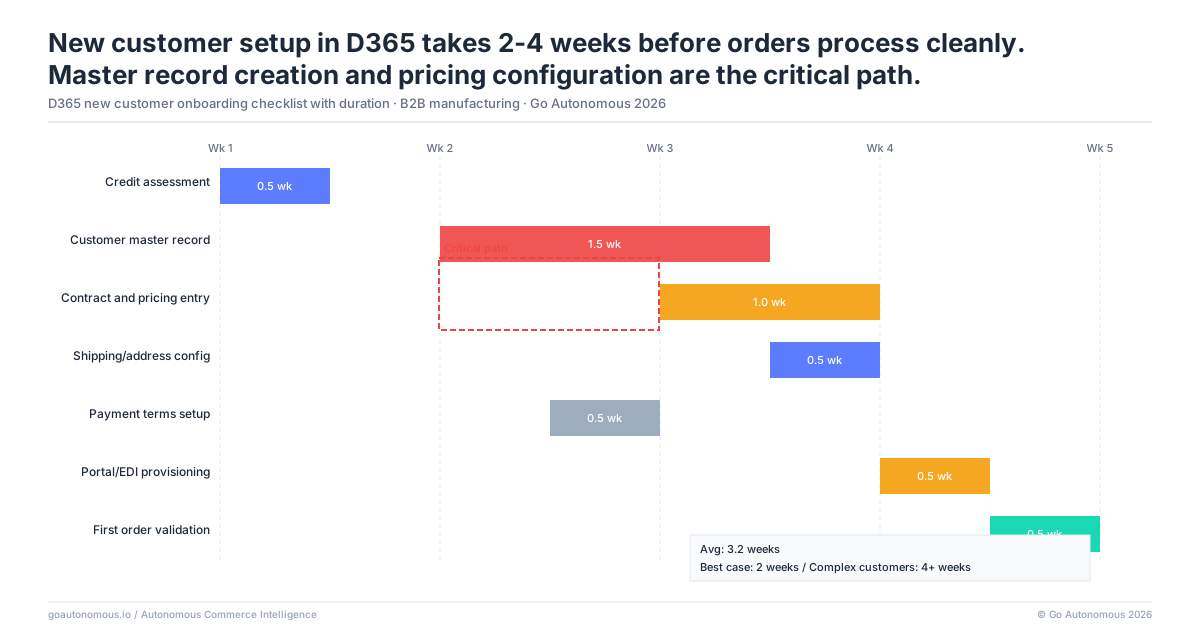
New Customer Setup in D365 Takes 2–4 Weeks Before First Orders Process Without Manual Intervention
What D365 Customer Master Record Creation Actually Requires
Microsoft Dynamics 365 requires a complete customer master record before it can process an order cleanly. In a manufacturing or distribution implementation, a complete record includes:
- Customer account details and legal entity information
- Billing and shipping addresses, with delivery method assignments
- Payment terms and credit limit
- Tax information and VAT registration number
- Applicable price lists and discount groups
- Customer-specific order conditions or constraints
Creating this record accurately requires collecting information from the customer, entering it across multiple D365 modules, and validating it against business rules. In most implementations, this takes 10–20 business days. That is not because D365 is slow: it is because the information collection, data validation, and sequential approval steps that precede record activation are slow. The efficiency cost of that delay falls on every order the new customer places during the setup window.
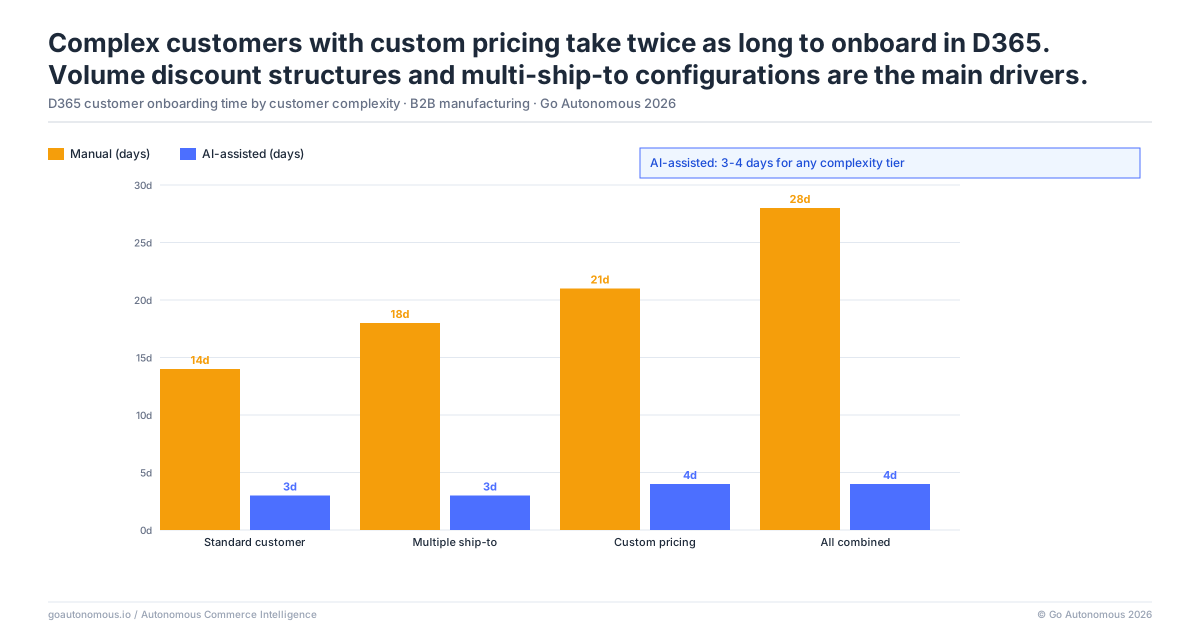
Why D365 Setup Time Has Not Decreased Despite ERP Maturity
Microsoft Dynamics 365 has matured significantly over successive releases. The underlying onboarding problem has not changed because it is not a software problem: it is a process and data problem. The information required to configure a new customer record must be collected from the customer, reviewed for completeness, entered by a trained admin, and validated by someone with authority to activate the record.
D365’s data model enforces referential integrity: a delivery address cannot be saved until the customer account exists; a price list cannot be assigned until the delivery address is configured; an order cannot be processed cleanly until the price list is applied. These dependencies exist for good reason. They also mean the setup process cannot be parallelized or accelerated beyond the pace of the slowest sequential step. The 2–4 week estimate reflects that structural constraint, not a configuration deficiency.
Each time we added one or two million euros in revenue, we had to add another operator. From a cost perspective, that's an unsustainable way of operating a business.

The D365 Onboarding Checklist: What Each Step Contains and Which Steps Cannot Run in Parallel
Sequential Dependencies: Why Master Data Setup Cannot Be Completed Before Pricing Is Configured
A complete D365 new customer onboarding checklist, in sequential order, includes: customer account creation, billing and shipping address setup, payment terms and credit limit configuration, tax group and VAT assignment, price list and discount group assignment, delivery method configuration, and test order validation. Each step requires the previous step to be complete. None can be done in parallel.
The practical consequence: if the information required for step 3 (payment terms) is not available from the customer on day 1, steps 4 through 7 cannot proceed until it arrives. A single missing data point from the customer can pause the entire sequence. Operations teams manage this by sending customer onboarding questionnaires and chasing responses while other tasks accumulate. The average time to receive a complete response from a new B2B customer to a data request is 3–5 business days. That alone accounts for a substantial share of the 2–4 week window.
The Item Reference Mapping Problem: A Step That Cannot Begin Until the First Orders Arrive
Item reference mapping is the step that introduces a second delay wave after the initial master data setup is complete. Most B2B customers use their own internal product codes on purchase orders. These codes must be mapped to the D365 item master before the system can process the order automatically. The mapping table cannot be built until the customer sends their first purchase orders containing those codes.
This circular dependency means the first 1–3 orders from any new customer require manual exception handling in D365, regardless of how well the master data is configured. Operations teams handle this by keeping new customer orders on a watch list and routing them to experienced reps who can match the customer’s product codes to D365 items manually. That workaround adds cost and doesn’t scale: each new customer added to the portfolio adds another watch list entry, and the watch list grows as customer acquisition grows. The autonomous commerce approach addresses this at the source rather than managing it manually.
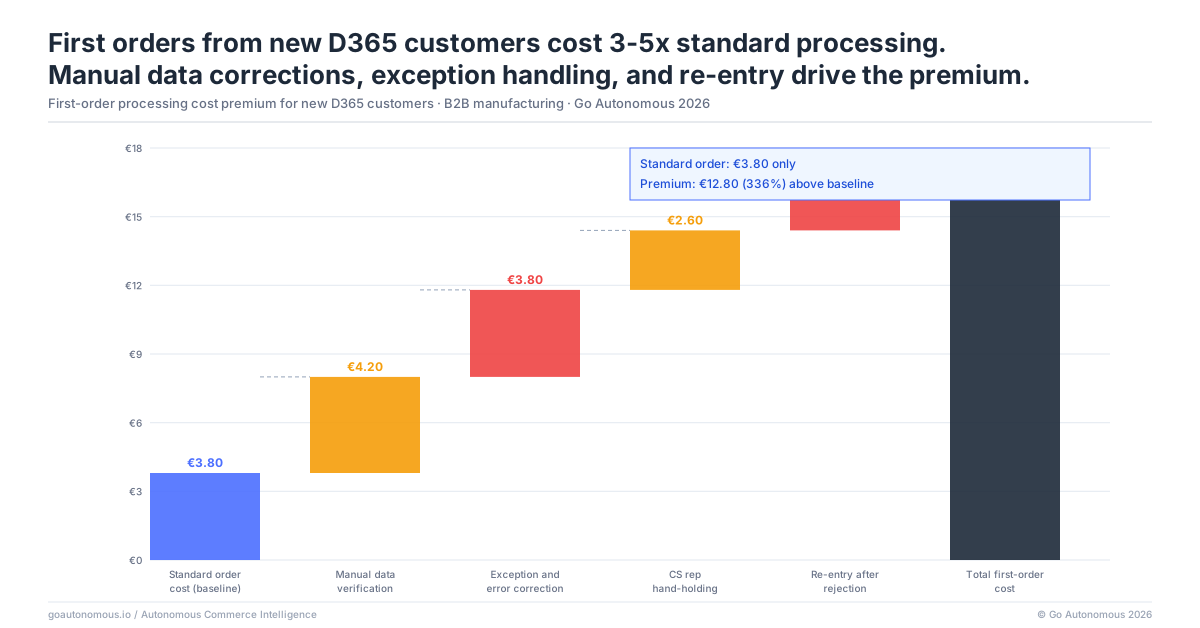
First Orders From New D365 Customers Cost 3–5x Standard Processing: The Onboarding Tax
What a New Customer’s First Order Costs Before the Master Data Is Complete
Orders from customers whose D365 master data setup is incomplete require manual handling that does not apply to established accounts. A customer service rep processing a first order from a new customer must: look up the customer’s details in the contract documentation rather than D365, apply pricing from the contract document rather than from an assigned price list, manually match the customer’s product references to D365 item numbers using the item catalogue, verify delivery addresses against the customer’s documentation, and manually confirm the order back to the customer.
This takes 3–5x the time of a standard order from an established account. With manual cost per order running €15–35 for standard processing, new customer first orders cost €45–175 per order in operations time. For a new account that places 10 orders during the onboarding window, that is €450–1,750 in processing overhead before the account generates full clean-order volume. Across a portfolio of 20 new accounts per year, that overhead is material and entirely avoidable.
The Error Rate on New Customer Orders vs. Established Account Orders
Error rates on new customer first orders in D365 are typically 2–3x higher than established account orders. The manual process relies on the rep’s familiarity with a customer they have never processed before, working from contract documentation rather than validated ERP data. Product codes are matched by inspection rather than by lookup. Pricing is applied from a document rather than from a rule.
The errors that result from these conditions, wrong products, incorrect pricing, misrouted shipments, occur in the first month of a relationship, when the customer is evaluating whether the supplier operates as professionally as the commercial team represented. A manufacturer like Nilfisk with a large and growing customer base cannot absorb this error rate at scale. Danfoss’s experience, processing across 26 countries and achieving 80% autonomous order handling, illustrates the gap between manual onboarding overhead and automated execution.
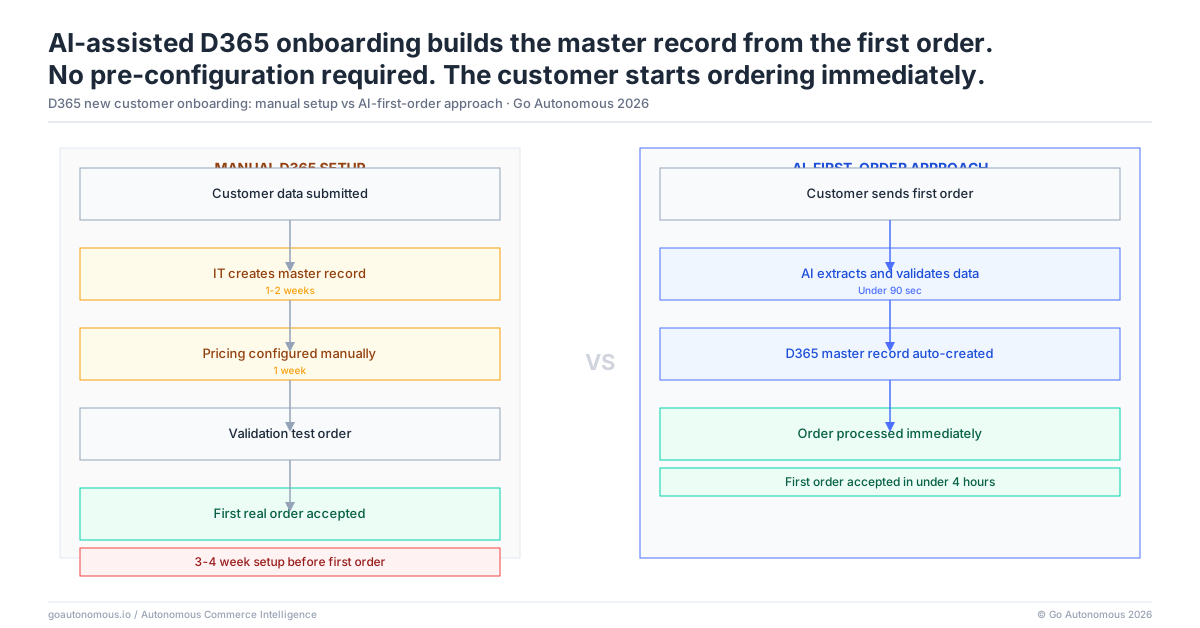
AI-Assisted D365 Onboarding Builds the Master Record From the First Inbound Order
How AI Extracts Customer Data From the First Purchase Order and Proposes D365 Master Data
AI-assisted D365 onboarding inverts the sequence. Rather than requiring the master data setup to be complete before the first order processes, the AI reads the first inbound purchase order from the new customer and uses it as the data source for building the D365 master record.
The process: the first PO arrives by email or via the customer’s ordering channel. The AI extracts the company name, billing address, shipping address, VAT number (from the PO header), payment terms (as stated on the PO), and product references (from every line item). It proposes a complete D365 customer master record for review: account details populated, addresses mapped, item reference table built from the PO line items. The operations team reviews the proposed record and confirms it rather than building it from scratch. Pricing and discount group assignment, which require commercial input, are the only steps that remain manual.
What D365 Operations Teams Gain When Onboarding Time Drops From Weeks to Days
When AI-assisted onboarding reduces D365 setup time from 2–4 weeks to 2–3 days, the operational implications are significant. The watch list for new customer orders becomes unnecessary: by the time a customer places their second order, their D365 record is complete and the order processes automatically. Early-order error rates match established account accuracy from day one because pricing is applied from the D365 price list rather than from a contract document, and product references are matched from the built item map rather than by manual inspection.
Operations teams stop allocating experienced rep time to new customer order triage. The onboarding overhead cost, €450–1,750 per new account, disappears. Revenue recognition for new accounts accelerates because full-volume ordering can begin within days of the commercial relationship starting. The efficiency gains compound across the full customer portfolio. Review what manufacturers operating D365 and other ERP platforms have achieved at Go Autonomous success cases.
The Autonomous Execution Fabric: Execution That Starts From the First Inbound Transaction
The AI-assisted D365 onboarding described in this post is one capability within the Autonomous Execution Fabric: a full commercial execution layer that connects directly to your Microsoft Dynamics 365 environment and executes every inbound commercial transaction without manual assembly. The Fabric handles the full setup chain, reading the customer’s first purchase order, proposing master data, mapping item references, as part of a broader execution model that covers every transaction type that follows: standard orders, pricing requests, quotes, returns, credit notes, and contract tenders.
The Fabric handles more than the onboarding gap. Once a new customer is active in D365, every subsequent order they place, by email, EDI, customer portal, or direct API, is processed through the same execution layer. Product references are matched from the item map built at onboarding. Pricing is retrieved from the D365 price list assigned during setup. The confirmed sales order is created in D365 within seconds. The 2–4 week onboarding delay and the subsequent manual processing overhead are both addressed by the same architecture.
New customer onboarding is a specific instance of a broader structural gap: operations that require manual setup before they can process any new input type are vulnerable to the same delays across every onboarding scenario. The same manual dependency that extends D365 customer setup typically extends new product range onboarding, new country rollouts, and new channel integrations. The Autonomous Execution Fabric is designed to handle each of these without a manual build cycle, because the execution layer reads content rather than matching it against pre-configured structures.
If your D365 implementation is creating a 2–4 week gap between commercial close and clean order processing for every new customer, book a conversation with Go Autonomous to see AI-assisted onboarding in a live D365 environment.
Frequently Asked Questions
How long does it take to onboard a new customer in Microsoft Dynamics 365 for B2B order processing?
Onboarding a new customer in Microsoft Dynamics 365 for B2B order processing takes 2–4 weeks in most mid-market manufacturer and distributor implementations. This covers customer account creation, billing and shipping address setup, payment terms and credit limit configuration, tax and VAT assignment, price list and discount group assignment, and test order validation. The timeline reflects the sequential dependencies in D365’s data model and the time required to collect complete information from the new customer.
What is included in the Dynamics 365 new customer setup for B2B order management?
Dynamics 365 new customer setup for B2B order management includes: customer account creation with legal entity information, billing and shipping address configuration, payment terms and credit limit setup, tax group and VAT registration entry, price list and discount group assignment, delivery method configuration, item reference mapping from the customer’s product codes to D365 item numbers, and test order validation. Each step has dependencies on the previous steps, which prevents parallel processing.
Why do first orders from new customers require manual handling in Dynamics 365?
First orders from new customers require manual handling in Dynamics 365 for two reasons. First, the customer master record may not be complete: if setup is still in progress, the ERP cannot apply pricing or validate delivery addresses automatically. Second, item reference mapping cannot be built until the customer’s first purchase orders arrive with their product codes, meaning the first 1–3 orders require a rep to manually match customer product references to D365 item numbers regardless of master data completion status.
Can AI automate new customer master data setup in Microsoft Dynamics 365?
Yes. AI-assisted onboarding for Dynamics 365 reads the first inbound purchase order from a new customer, extracts all relevant customer data (company details, addresses, VAT number, payment terms, product references), and proposes a complete D365 customer master record for review and confirmation. Item reference mapping is built from the PO line items in the same step. The operations team reviews and approves the proposed record rather than building it manually, reducing setup time from 2–4 weeks to 2–3 days.
How do B2B manufacturers reduce new customer onboarding time in Dynamics 365 without adding operations staff?
B2B manufacturers reduce new customer onboarding time in Dynamics 365 without adding operations staff by using AI to automate the master data creation workflow. Rather than assigning an admin to collect customer information, enter it across multiple D365 modules, and wait for approvals, the AI builds the proposed customer record from the first inbound purchase order and presents it for confirmation. This eliminates the manual collection and entry steps that account for most of the 2–4 week onboarding window.