.svg)





Why Every PDF Purchase Order Becomes a Manual Task in Dynamics 365
Microsoft Dynamics 365 processes sales orders from structured data. PDF purchase orders from customers are not structured data. For manufacturers running D365, every PDF that arrives in the inbox is a manual entry task: typically costing €8–15 per order before exceptions. This post explains the gap and shows how AI extraction bridges it without replacing Dynamics 365.
Microsoft Dynamics 365 is one of the most widely deployed ERP platforms in mid-market manufacturing and distribution. It handles structured sales order data well. What it cannot do is read a PDF. For operations teams running D365, every PDF purchase order that arrives from a customer is a manual task: open, extract, key in, validate. At 8–20 minutes per order, the cost runs €8–15 before exceptions, and with 20–40% of orders triggering at least one exception, the effective per-order cost across the full PDF pool runs €20–35. AI extraction closes this gap without replacing D365 or requiring customers to change how they order. See how Autonomous Commerce handles this end-to-end.
Table of Content
- Dynamics 365 Cannot Read a PDF: Every PDF Purchase Order Requires Manual Entry
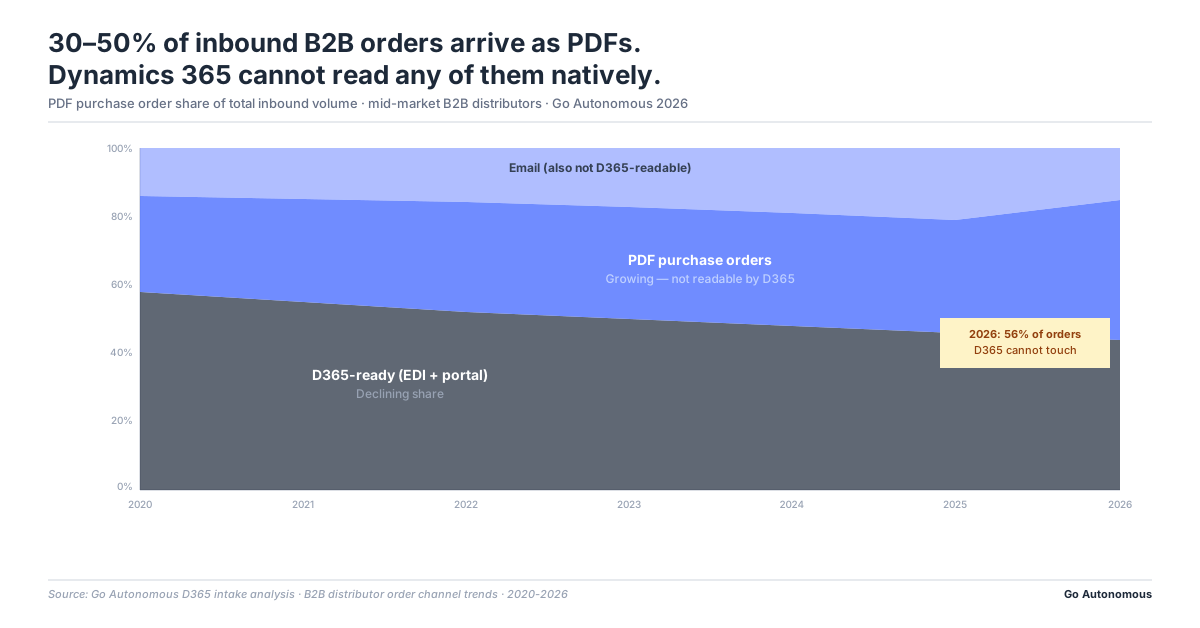
- PDF Purchase Orders Represent 30–50% of Inbound Order Volume for Mid-Market Distributors
- Manual PDF Entry Into D365 Costs €8–15 per Order Before Exceptions
- AI Extraction Reads PDF Purchase Orders and Writes to D365 Without Human Intervention
- The Autonomous Execution Fabric: Beyond PDF Orders in Dynamics 365
- Frequently Asked Questions
- How do you automate PDF purchase order processing in Microsoft Dynamics 365?
- Can AI extract data from PDF purchase orders and create sales orders in D365 automatically?
- What is the cost of manually entering PDF purchase orders into Dynamics 365?
- How do B2B distributors using Dynamics 365 handle PDF orders from non-EDI customers?
- What is the best way to reduce manual data entry for PDF orders in Microsoft Dynamics 365?
Dynamics 365 Cannot Read a PDF: Every PDF Purchase Order Requires Manual Entry
What D365 Needs to Create a Sales Order: Structured Fields, Master Data References
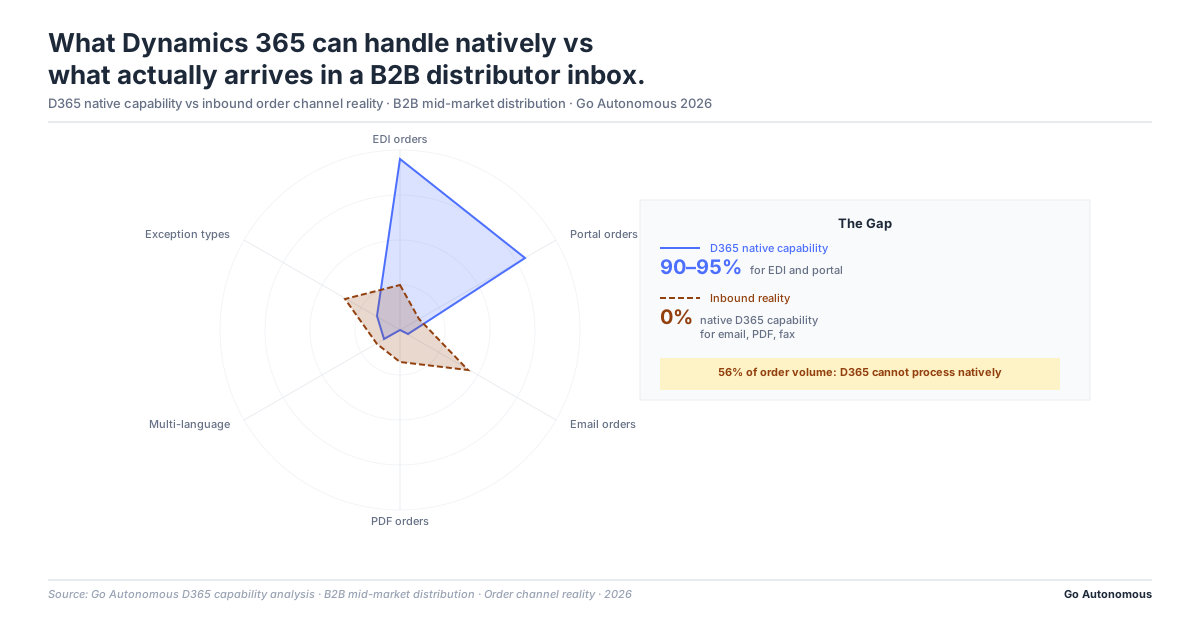
Microsoft Dynamics 365 Sales Order Management operates on structured input. To create a sales order, D365 requires a customer record matched to the account master, item numbers mapped to the product catalog, quantities in the correct unit-of-measure codes, pricing validated against the customer’s price book or contracted terms, and delivery information matching a registered ship-to address. Each field must be populated correctly and consistently for the order to process without error. D365 enforces this structure because it is the foundation for everything downstream: inventory reservation, production scheduling, shipping, invoicing, and revenue recognition. The structure is a feature, not a limitation. The limitation is that D365 has no native mechanism for extracting that structured data from an unstructured document.
What a PDF Purchase Order Actually Is: An Image of Text, Not Machine-Readable Data
A PDF purchase order is a document. Even a text-selectable PDF, as opposed to a scanned image, is a visual representation of order information, not a structured data file. The text characters in a PDF do not carry semantic meaning about what field they belong to. A sequence of digits on page two of a PDF might be a part number, a quantity, a price, a delivery date, or a purchase order reference number. D365 cannot distinguish between these without being explicitly told what each value means in terms of its data model. Even the most sophisticated PDF, generated by a modern procurement system, is at best a series of text strings in a layout that a human can interpret but that D365 cannot parse without human mediation or AI extraction. Every field must be identified, extracted, and entered manually, or the PDF must be discarded and the order re-entered from scratch. Autonomous Commerce addresses this at the intake layer, before the order touches D365.
PDF Purchase Orders Represent 30–50% of Inbound Order Volume for Mid-Market Distributors
Which Customers Send PDF Orders: The Long Tail of Non-EDI Accounts
EDI-connected customers send structured electronic orders that D365 can process with minimal human intervention. But EDI onboarding has a cost and a lead time: typically weeks to months of technical work per customer. Large, strategic accounts justify that investment. The long tail of mid-size customers does not. For a D365-running manufacturer or distributor with 500–2,000 active accounts, perhaps 10–20% are EDI-connected. The remaining 80–90% send orders in whatever format is convenient for their procurement team, and the most convenient format is a PDF export from their own ERP or procurement system. That PDF arrives by email, representing 50–70% of total B2B order volume in unstructured channels. For D365 users, this means a daily stream of manual entry tasks with no automated path.
Why PDF Volume Grows as the Customer Base Grows
The PDF problem is structurally self-reinforcing. As the customer base grows, through geographic expansion, new market entry, or commercial team growth, new customers are added faster than EDI connections can be established. New customers default to PDF because it requires no technical onboarding on their side. The operations team that was handling 200 PDF orders per week is now handling 400, then 600, without a proportional increase in the automation rate. This is the scaling dynamic Mikkel Diness Vindeløv described at Hempel: each incremental revenue addition required an incremental operator. Manual PDF processing into D365 is precisely this kind of headcount-linked cost: it scales linearly with volume, which means it never improves as a share of revenue without a structural change to the intake process.
Each time we added one or two million euros in revenue, we had to add another operator. From a cost perspective, that's an unsustainable way of operating a business.

Manual PDF Entry Into D365 Costs €8–15 per Order Before Exceptions
The Direct Cost: Time per Order at Standard Labor Rate
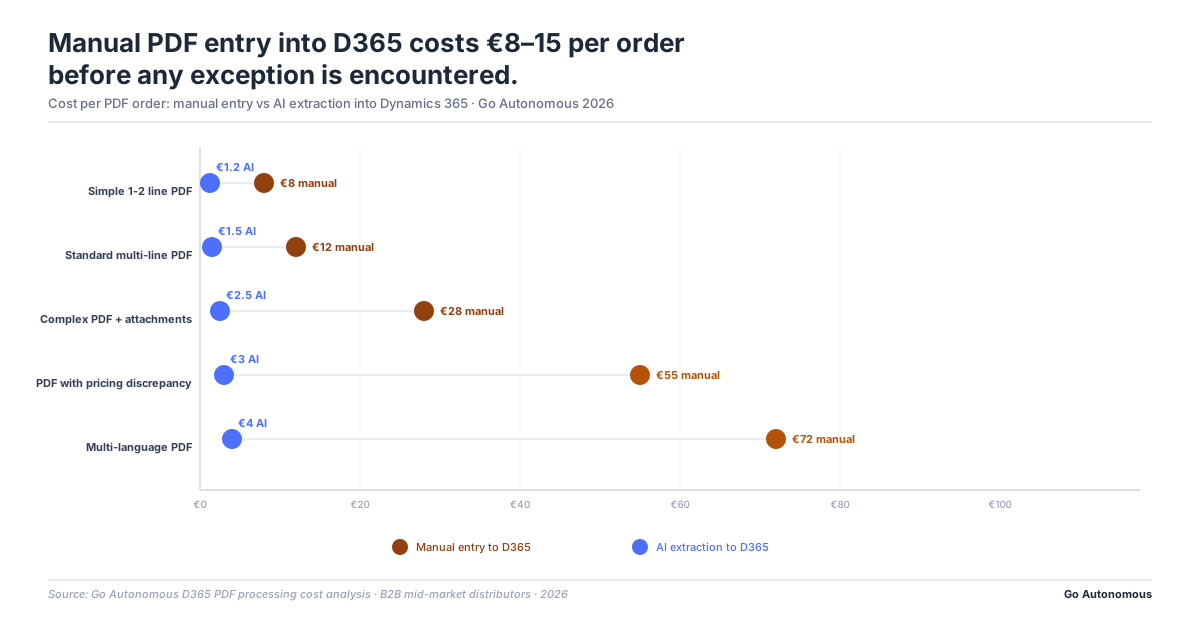
Manual PDF entry into D365 runs 8–20 minutes per order for an experienced customer service rep. The task involves opening the PDF, identifying each line item, looking up the product in D365 (which may involve navigating from a customer part number to an internal SKU), entering quantity and unit of measure, verifying pricing against the customer’s price book, checking the delivery address against the ship-to master, and saving the sales order. At standard customer service labor costs of €35–50 per hour fully-loaded, this translates to €5–17 per order in direct labor. A round figure of €8–15 per order represents a realistic midpoint for an operation with trained staff handling familiar customer accounts. New accounts, complex product lines, or multi-line orders push the cost toward the upper end of the range. The efficiency case for eliminating manual PDF entry compounds quickly at volume: 1,000 PDF orders per week at €10 average cost runs to €520,000 per year in direct labor before exceptions.
The Exception Premium: What Happens When the PDF Does Not Match D365 Master Data
The €8–15 base cost assumes the PDF maps cleanly to D365 master data. In practice, 20–40% of orders trigger at least one exception, and each exception adds 4–8x the base processing time. The most common PDF-specific exception in a D365 environment: the customer’s part number does not match the internal item number, requiring a manual cross-reference lookup or a customer call. A pricing mismatch between the PDF’s stated price and D365’s price book requires sales escalation and approval before the order can proceed. A delivery address entered differently than the D365 ship-to master fails validation. Each of these is a resolution task that can run 30–90 minutes. Across the full PDF order pool, 20–40% exception rate, each exception at 4–8x base cost, the effective per-order cost rises to €20–35. For operations processing 500+ PDF orders per week, this is a material operational cost that is typically buried in headcount budget rather than recognized as a process cost.
AI Extraction Reads PDF Purchase Orders and Writes to D365 Without Human Intervention
How AI Extraction Works: From PDF to D365-Ready Structured Fields
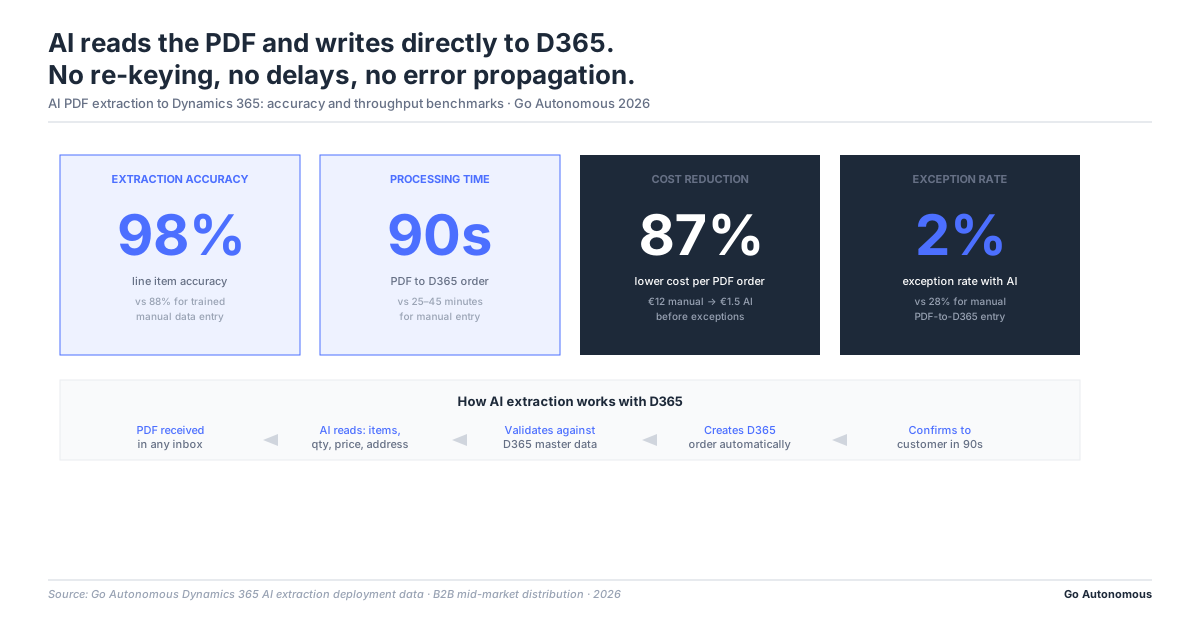
AI extraction trained on B2B order documents reads PDF purchase orders the same way an experienced rep does: recognizing item descriptions and matching them to catalog entries, extracting quantities and units, validating pricing against contracted terms, identifying delivery addresses and matching them to D365 ship-to records, and checking for conditions that would trigger an exception. The output is a structured data set ready for D365 sales order creation: either passed to the D365 API for automatic order creation, or presented to a rep for one-click review and approval on flagged exceptions. The rep no longer keys in data. They review AI-extracted data and approve or correct. This is a fundamentally different task: it takes 1–2 minutes per reviewed order instead of 8–20 minutes per entered order, and the exception rate on AI-extracted orders is significantly lower because validation happens before the order reaches the rep. See how this compares to rule-based approaches at RPA vs AI: rule-based automation cannot handle the variability of unstructured PDF formats and plateaus at approximately 60% automation rate.
What D365 Operations Teams Report After Closing the PDF Gap
Operations teams using AI extraction with Dynamics 365 environments consistently report the same pattern: order processing time drops from 8–20 minutes per order to under 60 seconds, error rates fall because AI does not miskey a digit when fatigued or rushing through a volume spike, and headcount holds flat despite significant order volume growth. Mediq demonstrated this pattern precisely: 4,000 orders per week, 75% faster processing, zero headcount increase. The Nilfisk implementation shows the same dynamic in a manufacturing context. The D365 environment does not need to change. The product catalog, pricing rules, customer master data, and order management workflows stay exactly as configured. AI extraction operates as an intake layer that transforms unstructured PDFs into the structured input D365 already expects. The technical footprint is minimal; the operational impact is immediate. See the full picture at Go Autonomous success cases.
The Autonomous Execution Fabric: Beyond PDF Orders in Dynamics 365
The AI extraction layer that reads PDF purchase orders and writes to Dynamics 365 is the order intake component of the Autonomous Execution Fabric. The Autonomous Execution Fabric is a full commercial execution layer that connects directly to your Dynamics 365 environment and processes every inbound commercial transaction without human assembly. PDF orders are the most visible manifestation of the gap between what customers send and what D365 requires. The Fabric closes that gap not just for orders, but for every commercial transaction type that arrives unstructured.
The Fabric handles more than PDF purchase orders. The same D365 users who receive PDF orders also receive quote requests by email, return authorization requests by email, pricing inquiries by email, and credit claim documents as PDF attachments. Each requires the same translation process: interpret the unstructured document, look up the relevant D365 records, and create or update the transaction. The Autonomous Execution Fabric processes returns, quotes, pricing requests, credit notes, and tenders through the same AI extraction and D365 API integration that handles PDF orders, without human data entry for any transaction type.
D365 operations teams that close the PDF order gap find the same architecture available for every other commercial transaction. The customer service team that was spending 8–20 minutes per PDF order entry also spends equivalent time on PDF return requests and email quote responses. The Autonomous Execution Fabric eliminates the manual entry task across the full commercial transaction layer. The D365 environment does not change: the product catalog, pricing rules, customer master data, and order workflows stay exactly as configured. The Fabric operates as the intake layer that transforms every unstructured customer transaction into the structured input D365 already expects.
If your team is manually entering PDF purchase orders into Dynamics 365, the cost is likely higher than reported and the fix is less disruptive than assumed. Book a session with Go Autonomous to see what AI extraction looks like in a D365 environment and calculate what automation would return in your operation.
Frequently Asked Questions
How do you automate PDF purchase order processing in Microsoft Dynamics 365?
AI extraction layers trained on B2B order documents read incoming PDF purchase orders, extract each order field (customer ID, item numbers, quantities, pricing, delivery address), validate against D365 master data, and create the sales order via the D365 API: all without human data entry. The D365 environment requires no reconfiguration; AI operates as an intake layer before the order enters D365.
Can AI extract data from PDF purchase orders and create sales orders in D365 automatically?
Yes. AI extraction trained on B2B order documents identifies and extracts each required field from PDF purchase orders, matches customer part numbers to internal item numbers, validates pricing and delivery addresses against D365 master data, and creates the sales order automatically via API. Orders with genuine exceptions are flagged for human review rather than keyed in manually.
What is the cost of manually entering PDF purchase orders into Dynamics 365?
Manual PDF entry into D365 costs €8–15 per order in direct labor before exceptions (8–20 minutes per order at standard customer service labor rates). With 20–40% of orders triggering exceptions and each exception adding 4–8x the base processing time, the effective cost across the full PDF order pool is typically €20–35 per order.
How do B2B distributors using Dynamics 365 handle PDF orders from non-EDI customers?
Most D365 distributors handle non-EDI PDF orders through manual data entry: a customer service rep opens the PDF and keys each field into D365. The alternative is AI extraction, which reads the PDF, validates each field against D365 master data, and creates the sales order automatically. This eliminates the manual entry task while keeping D365 workflows unchanged.
What is the best way to reduce manual data entry for PDF orders in Microsoft Dynamics 365?
AI extraction is the most effective approach. Unlike rule-based OCR tools that require rigid template configuration per customer format, AI trained on B2B order documents handles format variation across customers without reconfiguration. It validates against D365 master data, flags exceptions before they enter the processing queue, and creates sales orders via the D365 API: reducing per-order processing time from 8–20 minutes to under 60 seconds.