.svg)





Why the Contracted Price Doesn’t Always Ship, Even When Dynamics 365 Has It Right
Microsoft Dynamics 365 stores agreed contract prices. The problem is that applying those prices correctly depends on a manual order entry process where errors are frequent and hard to catch. For B2B manufacturers running D365, the gap between the contracted price and the price that ships is primarily a process problem, not an ERP problem. This post explains where contract pricing breaks down in D365 environments and what automated intake changes.
Pricing errors in B2B manufacturing and distribution do not originate in the ERP. Microsoft Dynamics 365 stores the correct contract price. The failure point is manual order entry: a process where 20–40% of orders trigger some form of exception, and where pricing misapplication generates disputes that cost €100–300 per incident to resolve. For operations processing hundreds of orders daily, even a 2% pricing error rate produces a significant and preventable cost burden.
This post examines where contract pricing breaks down in D365 environments, what the downstream cost of a pricing exception looks like, and how automated intake with D365 pricing API validation eliminates the problem at the source.
Table of Content
- D365 Holds the Correct Contract Price: Manual Entry Is Where It Gets Misapplied
- Pricing Misapplication in D365 Costs €100–300 per Incident When the Dispute Reaches the Customer
- The D365 Pricing Exception Backlog Grows With Customer Base Complexity
- Automated Order Intake With D365 Pricing API Validation Applies the Correct Price Every Time
- The Autonomous Execution Fabric: Applying the Right Price at Every Execution Point in D365
- Frequently Asked Questions
- Why do pricing errors occur in Microsoft Dynamics 365 order management despite having trade agreements configured?
- How do B2B manufacturers prevent contract pricing errors in Dynamics 365?
- What is the cost of a pricing exception in a Dynamics 365 B2B order management environment?
- Can AI automatically validate contract pricing in Microsoft Dynamics 365 at order entry?
- How do B2B distributors reduce invoice disputes from Dynamics 365 pricing misapplication?
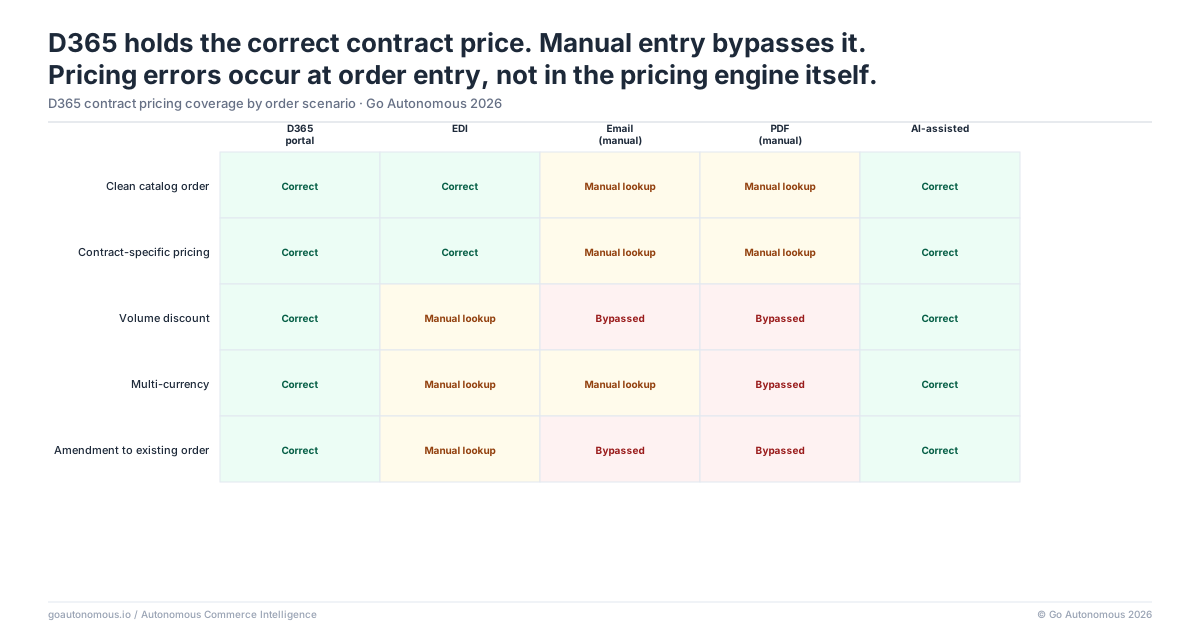
D365 Holds the Correct Contract Price: Manual Entry Is Where It Gets Misapplied
How Customer-Specific Pricing Works in D365: Trade Agreements, Price Lists, and Discounts
Dynamics 365 supports sophisticated contract pricing structures built for complex B2B commercial relationships. Customer-specific trade agreements define negotiated unit prices for individual accounts. Price lists segment customers into pricing groups with differentiated rates. Volume-based discount structures apply tiered pricing when order quantities cross defined thresholds. Promotion-specific price lists apply during defined campaign periods. All of this data sits in D365, correctly configured, ready to apply.
The system is not the problem. D365 will apply the correct price if the order is entered with the correct inputs: the right customer account, the right pricing group association, the right quantity to trigger the applicable tier, and no conflicting promotions active on the line. Each of those inputs requires a human decision at the point of entry.
The Manual Entry Points Where Contract Pricing Is Frequently Applied Incorrectly
Manual order entry in D365 creates multiple decision points where pricing can be misapplied. The customer service rep must identify the correct customer account (not a duplicate or a related subsidiary), select or confirm the applicable pricing group, verify that the order quantity triggers the correct discount tier, and confirm that no conflicting promotions override the base trade agreement. Under normal conditions, an experienced rep handles this accurately. Under time pressure, during peak volume periods, or when handling an account whose pricing structure they see infrequently, the probability of error rises.
The most common misapplication patterns are: wrong pricing group selected for a subsidiary account, quantity entered slightly below a tier threshold when the customer expects the tier price, and base list price applied when a customer-specific trade agreement exists but is not surfaced prominently during entry. None of these are D365 failures. They are human attention failures in a process that requires sustained accuracy across hundreds of daily transactions. The result is an order at the wrong price, confirmed to the customer, queued for fulfillment, and heading toward an invoice dispute. Reducing the manual entry load is the starting point for reducing pricing exceptions. See how operational efficiency gains compound when the entry process is automated.
Each time we added one or two million euros in revenue, we had to add another operator. From a cost perspective, that's an unsustainable way of operating a business.

Pricing Misapplication in D365 Costs €100–300 per Incident When the Dispute Reaches the Customer
The Pre-Invoice Detection Rate: How Often D365 Pricing Errors Are Caught Before They Ship
Some pricing errors in D365 are caught before invoicing. A quality check step, a supervisor review on large orders, or an automated variance flag can surface a price that does not match the expected contract rate. When caught pre-invoice, the correction is relatively contained: the order is cancelled or revised, re-entered at the correct price, and re-confirmed to the customer. The cost is the rework time: approximately €15–30 per incident, counting the rep time to identify, correct, and re-confirm.
Errors not caught before invoicing are more expensive by an order of magnitude. Detection rates for pre-invoice pricing errors depend on whether a specific review step exists, how consistently it is applied, and whether D365 has any variance alerts configured. For operations without systematic pricing validation, the majority of errors ship with the order.
The Full Dispute Workflow When a D365 Pricing Error Reaches the Customer’s Finance Team
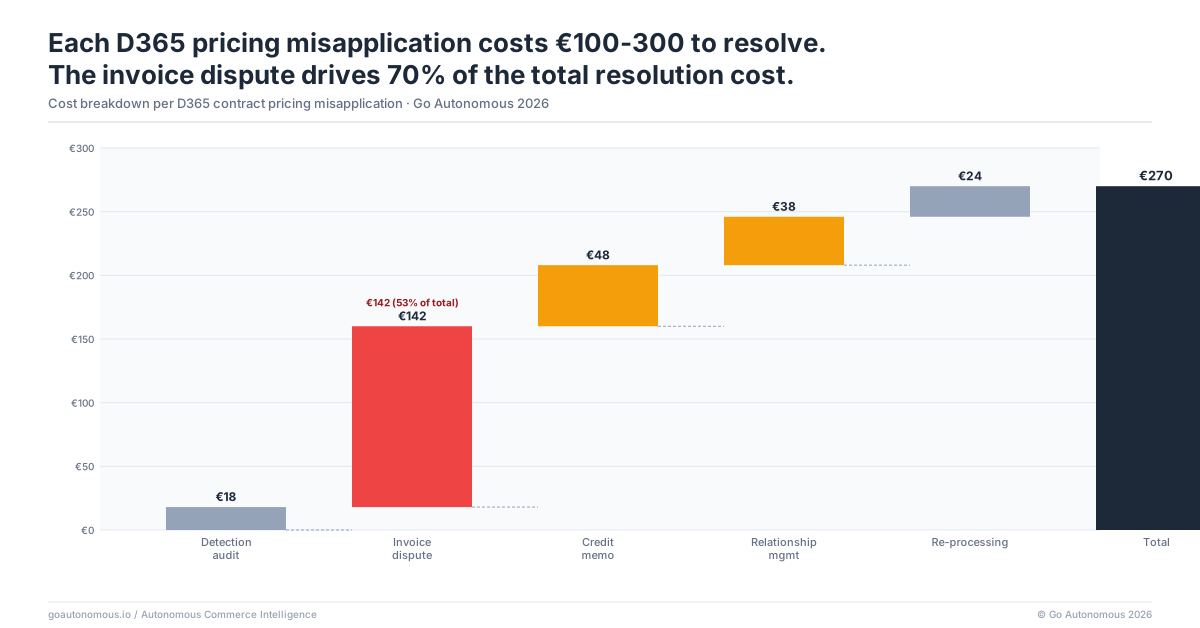
When a pricing error reaches the customer, the resolution workflow involves multiple functions and days of elapsed time. The customer’s accounts payable team identifies the discrepancy between the purchase order price and the invoice price. They raise a dispute. The supplier’s customer service team receives the dispute, pulls the original order from D365, locates the applicable trade agreement, and determines whether the error was in data entry or in the trade agreement configuration itself. If the error is confirmed, a credit note or corrected invoice must be issued. Finance processes the adjustment. If the account is strategically important, sales may be involved to manage the relationship impact.
Total cost per incident: €100–300, accounting for customer service investigation time, finance processing time, credit note issuance, and any expedited communication required for strategic accounts. For operations processing 500 or more orders per day at a 2% pricing error rate, that is 10 incidents daily. At a conservative €150 per incident, the monthly cost from pricing misapplication alone exceeds €45,000. The Hempel experience illustrates the core dynamic: each increment of revenue added more operational cost, and the cost was not in fulfillment or logistics but in the process overhead of handling each order manually.
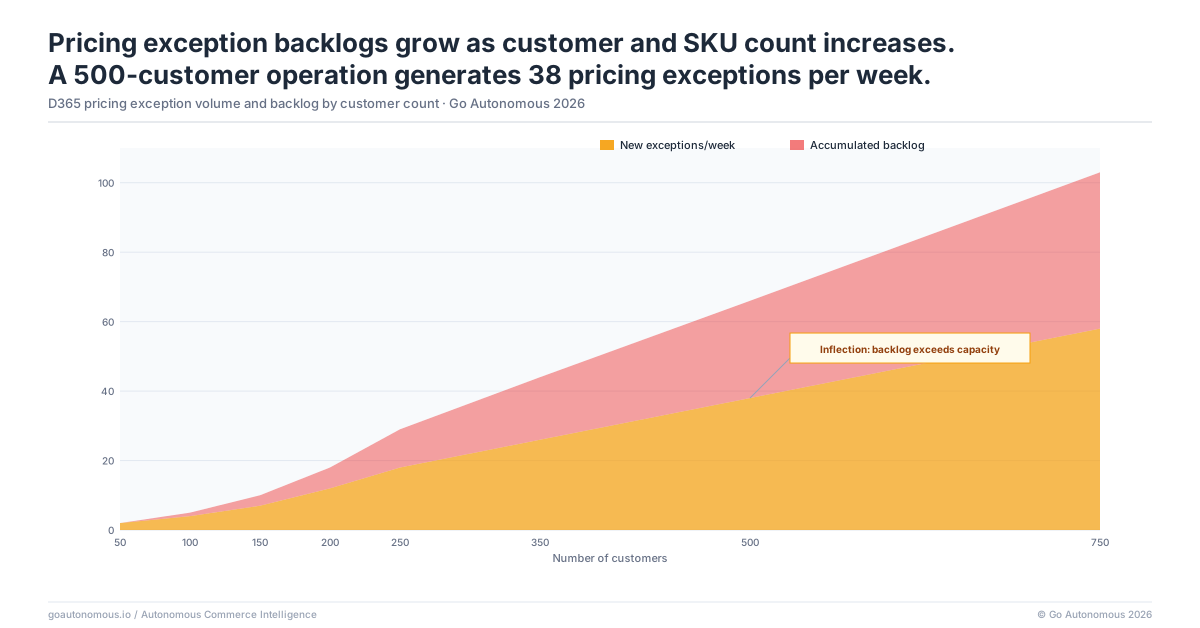
The D365 Pricing Exception Backlog Grows With Customer Base Complexity
Why Larger Customer Bases Have Higher Pricing Error Rates: The Complexity Correlation
Pricing complexity in D365 grows with customer base size in a non-linear way. Each new customer potentially has a unique trade agreement. International customers may have currency-specific pricing. Strategic accounts negotiated over multiple contract cycles may have tiered discount structures that reflect historical volume commitments and promotional incentives layered on top of the base contract. The catalog of unique pricing configurations grows with each customer added and each contract renewed.
As configuration complexity grows, the probability that any given customer service rep applying a price for any given account has full, accurate recall of that account’s pricing structure decreases. D365 holds the data. But the rep must navigate to it correctly under time pressure. The error rate is not constant across accounts: it is lowest for high-frequency accounts the rep handles daily, and highest for accounts processed infrequently, accounts recently onboarded with new pricing structures, and accounts with multi-tier discount structures that require quantity awareness at the line-item level.
What the Finance Team Sees at Month-End When D365 Pricing Errors Have Accumulated
Month-end reconciliation is when accumulated pricing errors surface as a concentrated problem. Finance teams reconciling invoiced amounts against contracts discover discrepancies that span the prior four weeks of order activity. Each discrepancy triggers a dispute investigation. The volume of correction activity compresses into the final days of the month, creating a burst that consumes both finance capacity and customer service capacity simultaneously. Both teams are pulled from forward-looking activities to resolve errors from the prior period.
This is not a D365 configuration problem. The trade agreements in D365 are correct. It is a scale problem inherent to manual entry: as order volume grows, the absolute number of pricing errors grows proportionally even if the error rate remains constant. The month-end backlog is a structural output of manual entry volume, not a symptom that can be resolved by improving D365 configuration or adding training cycles.
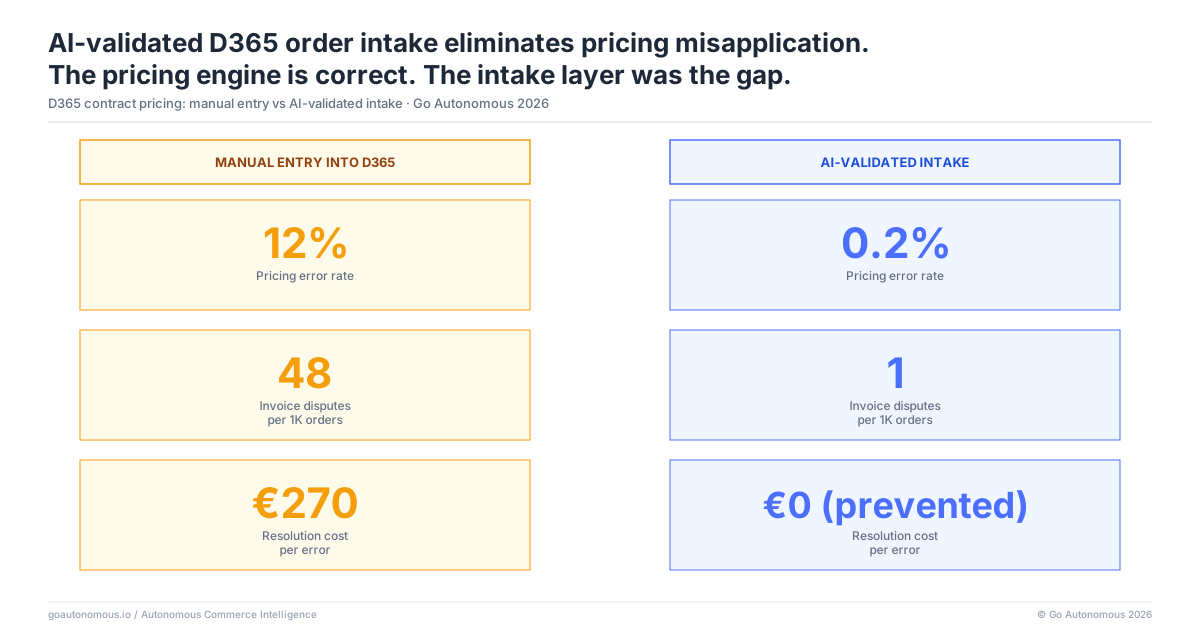
Automated Order Intake With D365 Pricing API Validation Applies the Correct Price Every Time
How Pricing Validation Works: From Inbound Order to D365 API Price Check
An AI intake layer that calls the D365 pricing API at the point of order entry removes the human decision point from the pricing application process entirely. When an inbound purchase order arrives, by email, PDF, or portal, the AI extracts the customer identifier, line items, quantities, and the price stated on the customer’s purchase order. Before creating any order in D365, it calls the pricing API with the customer account, product, and quantity to retrieve the correct contract price.
If the retrieved D365 price matches the purchase order price within an authorized tolerance, the order is created at the correct price. If they diverge beyond the tolerance, the discrepancy is flagged for review before the order is created. No incorrect price enters D365. No invoice is generated at a wrong rate. No dispute is triggered. The correct D365 contract price is applied at the moment of intake, automatically, for every order regardless of volume.
What Finance and Customer Service Operations Look Like After Pricing Exception Rate Drops
When pricing exceptions approach zero, the operational profile of both finance and customer service changes materially. Finance month-end reconciliation no longer generates a dispute backlog. The credit note workflow shrinks. Customer service capacity allocated to dispute investigation is reallocated to proactive account management and order-related inquiries that create commercial value. The customer relationship improves because invoice accuracy is consistent.
The D365 investment delivers its full value: the sophisticated trade agreement and pricing tier structure that the commercial team built into the system actually applies correctly on every order. See how Nilfisk eliminated manual entry errors at Nilfisk’s autonomous order management deployment. More customer outcomes are available at Go Autonomous success cases. The architecture behind the outcome is Autonomous Commerce: AI that executes orders, not assists with them.
The Autonomous Execution Fabric: Applying the Right Price at Every Execution Point in D365
The Dynamics 365 pricing exception problem is a specific instance of a broader execution gap: commercial transactions that arrive from outside the ERP and require human judgment to connect them to the correct D365 data. The Autonomous Execution Fabric is a full commercial execution layer that connects directly to your Dynamics 365 environment and executes every inbound commercial transaction without human assembly. For contract pricing, the Fabric calls the D365 pricing API at the moment each order arrives, retrieves the correct trade agreement or price list price for the specific customer, product, and quantity, and creates the sales order with the validated price. No manual decision point in the pricing application process.
The Fabric handles every commercial transaction type that touches D365 pricing: orders from email, EDI, customer portal, and direct API; pricing requests; quote delivery; return authorization; credit note issuance; and contract tender responses. Each of these transaction types applies a price at some point in the workflow. Each carries the same exposure to manual misapplication when human entry is involved. The Fabric applies D365 pricing API validation across all of them, removing the entry decision point wherever it occurs in the commercial transaction lifecycle.
The D365 pricing complexity that drives exception volume grows with the customer base. Each new customer, each new contract cycle, each new market or geography adds pricing configuration that the manual entry process must navigate correctly. This complexity scales permanently. Training and process improvement help but do not eliminate errors because the fundamental constraint is human attention at sustained high transaction volume. The Autonomous Execution Fabric scales with the complexity: as D365 pricing configurations grow, the Fabric applies them correctly at intake for every transaction type, without requiring additional human attention per transaction.
If your D365 environment is generating pricing exceptions that appear in customer disputes and month-end reconciliation, the fix is upstream of D365, not inside it. Book a session with Go Autonomous to see how automated intake with D365 pricing validation works in your environment.
Frequently Asked Questions
Why do pricing errors occur in Microsoft Dynamics 365 order management despite having trade agreements configured?
Pricing errors in D365 occur not because the trade agreements are wrong, but because applying them correctly requires manual decisions at order entry: selecting the right customer account, confirming the applicable pricing group, and verifying that the quantity triggers the correct discount tier. Under time pressure or with infrequently handled accounts, these decisions produce errors even when the D365 configuration is accurate.
How do B2B manufacturers prevent contract pricing errors in Dynamics 365?
The most effective method is automated order intake that calls the D365 pricing API before creating each order. The AI retrieves the correct contract price for the specific customer, product, and quantity combination and validates it against the price on the inbound purchase order before entry. This removes the human decision point from pricing application entirely.
What is the cost of a pricing exception in a Dynamics 365 B2B order management environment?
Pricing errors caught before invoicing cost approximately €15–30 per incident in rework time. Errors that reach the customer and generate a dispute cost €100–300 per incident when accounting for customer service investigation, finance correction, credit note issuance, and relationship management time.
Can AI automatically validate contract pricing in Microsoft Dynamics 365 at order entry?
Yes. An AI intake layer calls the D365 pricing API with the customer account, product, and quantity to retrieve the correct contract price before creating the order. If the retrieved price matches the purchase order price within an authorized tolerance, the order is created automatically. If they diverge, the discrepancy is flagged for review before entry.
How do B2B distributors reduce invoice disputes from Dynamics 365 pricing misapplication?
The structural solution is removing human data entry from the pricing application step. Automated intake that validates each inbound purchase order price against the D365 contract price before order creation eliminates the pricing mismatch before it reaches an invoice. This reduces dispute volume, month-end reconciliation backlog, and the finance overhead associated with credit note processing.