
.svg)





Outlook Integration: Autonomous Quote and Order Execution
Every quote request and purchase order in your Outlook inbox, processed automatically. The Execution Fabric reads the email, validates against your ERP, and creates the confirmed record in seconds.

Outlook Has Your Quotes and Orders. Your Team Has to Find Them.
Every B2B manufacturer and distributor has an order inbox. Most have dozens. Every email in it requires a human to read it, interpret it, look up ERP data, and enter an order manually.
Average processing time: 4-48 hours per order batch. Error rate on manual entry: 3-5%. Every long-tail customer who does not use EDI or your portal lands in that inbox.
The Autonomous Execution Fabric reads every email, so your team does not have to.
Microsoft 365 and Outlook connected via standard Graph API. Every order email processed in seconds. See all integrations.
Six Ways Autonomous Execution Transforms Outlook Processing
Process every order email in seconds: no operator reading required
The Execution Fabric reads every inbound order email and creates the ERP record automatically.
Extract order data from any email format: body, PDF, spreadsheet, scan
Plain text, attached PDFs, Excel attachments, scanned orders. All extracted and validated.
Validate every email order against ERP pricing and inventory before entry
Every line item checked before a record is created. No incorrect prices, no stock errors.
Respond to quote requests in seconds: not hours or the next business day
RFQs arriving by email are read, priced, and responded to automatically in the same flow.
Eliminate manual order inbox management across every shared mailbox
No more shared inbox queues, forwarded emails, or manual status updates. Fully automated.
Connect Outlook to SAP, Oracle, or Dynamics 365 without IT reconfiguration
Standard Microsoft Graph API connection. No Outlook changes. No Power Automate flows.
How the Autonomous Execution Fabric Reads Your Outlook
How the Autonomous Execution Fabric Reads Your Outlook
No Outlook add-in. No Power Automate. No IT project required.
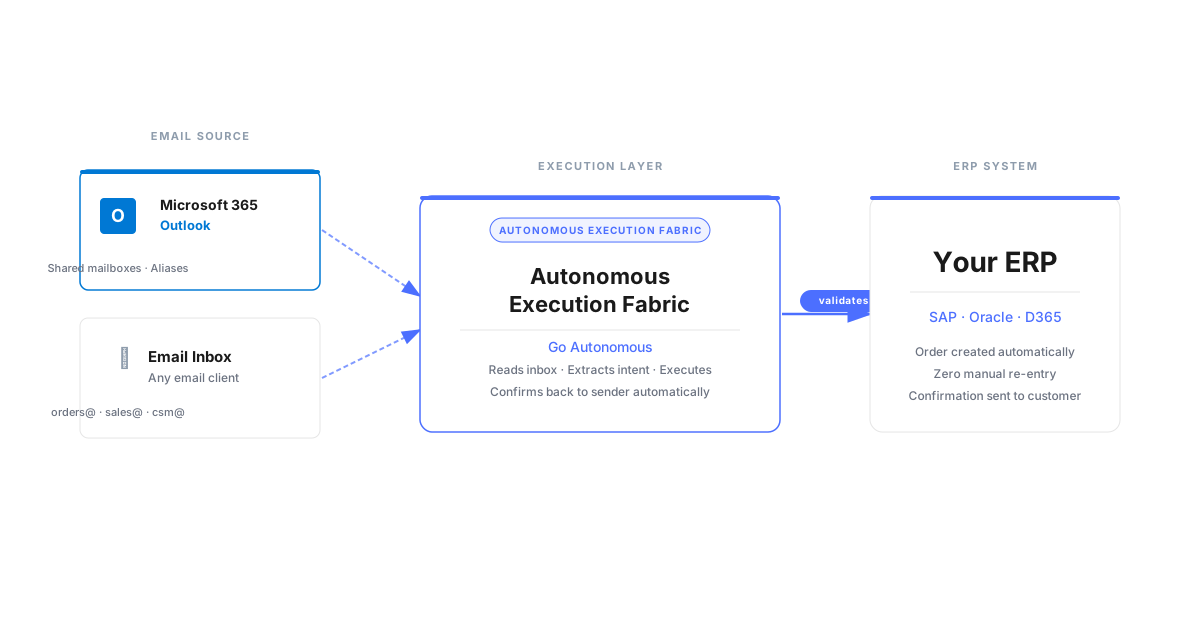
The Execution Fabric connects to Microsoft 365 via standard Graph API. It monitors designated inboxes, reads incoming order emails, and processes them the moment they arrive. Your mailbox rules and folder structure stay exactly as they are.
Every Email Validated and Into ERP, Without a Manual Step
Every Email Validated and Into ERP, Without a Manual Step
Email arrives. Execution Fabric reads it. Validates against ERP. Record created. Confirmation sent.
The entire flow from email receipt to ERP record completes in seconds. Nilfisk reduced order errors by 43% after replacing manual email processing with autonomous execution. See the email order processing use case.
Want to See What End-to-End Execution Looks Like?
Want to See What End-to-End Execution Looks Like?
Download the white paper on autonomous quote and order execution.
The complete playbook covering email order processing, ERP validation, and end-to-end execution. Includes examples of email types handled and the validation flow used before ERP record creation.

From Outlook Email to ERP Record: End-to-End Execution
From Outlook Email to ERP Record: End-to-End Execution
A live walkthrough of an order email being processed by the Execution Fabric.
An order arrives in Outlook. The Execution Fabric reads it, extracts line items, validates against SAP pricing and inventory, and creates the confirmed sales order in under 10 seconds.
No content available.
Autonomous Email Execution: What It Delivers for B2B Teams
Autonomous Email Execution: What It Delivers for B2B Teams
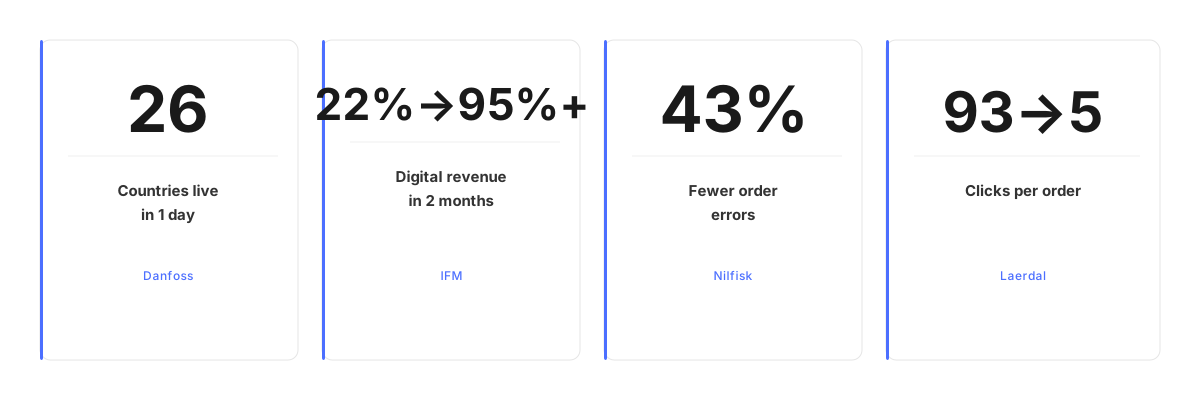
Fewer order errors (Nilfisk)
Digital revenue in 2 months (IFM)
Orders fully autonomous (Velux)
Countries live in 1 day (Danfoss)
Frequently Asked Questions About Outlook Order Processing
How does Go Autonomous process orders from Outlook email?
The Autonomous Execution Fabric connects to your Microsoft 365 or Outlook mailbox via standard Microsoft Graph API. When an order email arrives, the Execution Fabric reads it, extracts the order data, validates it against your ERP, and creates the confirmed sales order record automatically.
Does Go Autonomous require changes to our Outlook or Microsoft 365 setup?
No. The Execution Fabric connects via Microsoft Graph API: a standard interface available in all Microsoft 365 plans. No Outlook add-ins, no Power Automate flows, no IT configuration changes.
What types of order emails can the Execution Fabric process?
All of them. Plain-text emails, emails with PDF attachments, spreadsheet attachments, scanned documents, forwarded emails, and emails in any language. The Execution Fabric extracts structured order data from unstructured email formats.
How does Go Autonomous handle RFQs and quote requests in Outlook?
When an RFQ arrives in Outlook, the Execution Fabric reads it, extracts the quote request data, matches it against your ERP pricing and inventory, generates the quote response, and sends confirmation to the customer automatically.
Which ERP systems does Outlook order processing connect to?
SAP, Oracle, Dynamics 365, and any ERP with a standard REST or database connection. The Execution Fabric validates every email order against your ERP master data before creating the record.
What is the error rate on email orders processed automatically?
The Execution Fabric validates every extracted order against ERP master data before creating a record. If a line item cannot be matched with confidence, it is flagged for review. Nilfisk reduced order errors by 43% after deploying autonomous execution across email and other channels.
Is Outlook order processing only for large enterprises?
Autonomous Outlook order processing is built for B2B manufacturers and distributors with significant order volume, but the economics work at any volume where manual email processing creates operational cost. Deployment takes 2-4 weeks.
What B2B Leaders Say About Autonomous Email Execution


Ready to Process Every Email Order Automatically?
See the Autonomous Execution Fabric connect to Outlook and process a live order email end-to-end in seconds.
Ready to Process Every Email Order Automatically?
See the Autonomous Execution Fabric connect to Outlook and process a live order email end-to-end in seconds.